The New Gemini App 2026: Inside the Neural Expressive Redesign Every iPhone and Android User Will Notice
Google’s Gemini app got a full visual redesign at Google I/O 2026 on May 19. It is called Neural Expressive. There are new fonts, new animations, haptic feedback when you tap things, and a completely new layout that finally feels worth opening daily. Here is what changed, why Google bothered, and how to get the most out of the new app whether you are on Android or iPhone.
What Gemini app redesign covers
- Why Google Did the Gemini App Redesign
- What the Gemini App Redesign Neural Expressive Actually Means
- What Is Inside the Gemini App Redesign
- How the Gemini App Redesign Compares to ChatGPT and Claude
- How to Get the Gemini App Redesign on Android and iPhone
- Gemini App Redesign Settings Worth Tuning After You Update
- Gemini App Redesign Frequently Asked Questions
- How Precision Pulse Helps Businesses Use the Gemini App Redesign
- Want help setting up the Gemini app redesign properly for your business?
- Why the Gemini app redesign matters more than a usual update
Why Google Did the Gemini App Redesign
The Gemini app has been around since Google’s first big push into consumer AI in 2024. The first version was functional but most people thought it felt like a stripped down version of the Google Search app with chat slapped on top. That is part of the reason most people kept opening ChatGPT or Claude when they wanted to talk to an AI.
At Google I/O 2026, Google admitted this in not so many words and launched a complete visual overhaul called Neural Expressive. The goal is simple. Make the app feel premium enough that people actually choose to open it daily, not just when they remember Gemini exists. Winbuzzer wrote up the redesign in detail, calling it the most polished consumer AI app shipped to date.
What the Gemini App Redesign Neural Expressive Actually Means
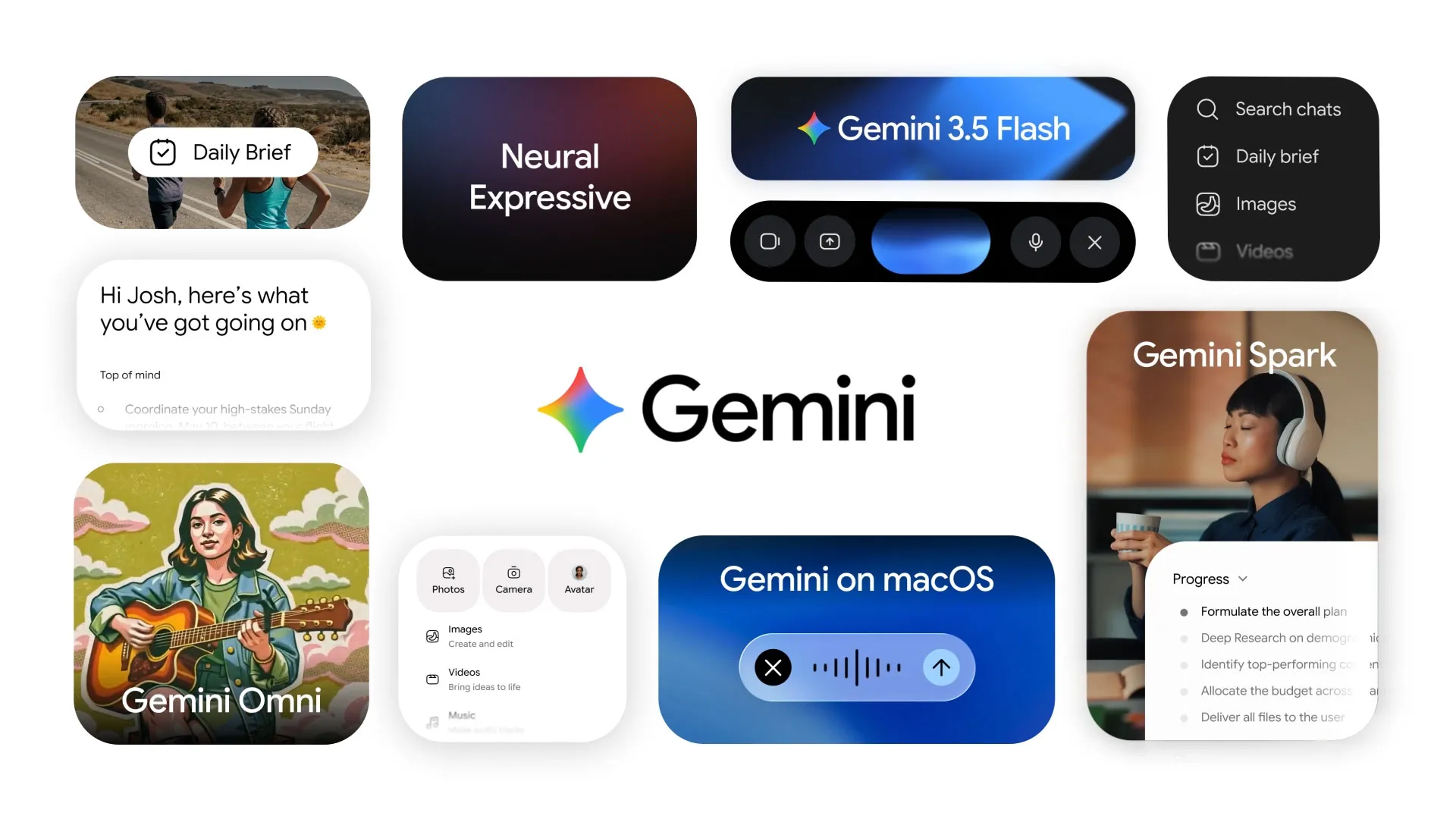
Neural Expressive is Google’s name for the new design language. It is not just a paint job. Five specific things changed.
New custom typography
Google rolled out a custom variable font designed specifically for the Gemini app. It animates between weights as you scroll, draws attention to important parts of an answer, and feels noticeably more polished than the previous Roboto based design. Small change, large feel difference.
Fluid animations everywhere
Cards expand smoothly. Replies stream in with a wavy underline effect that signals AI thinking. Suggested follow ups slide into view with momentum. The animation language is meant to feel “neural”, organic, alive, rather than mechanical like the old chat bubble interface.
Haptic feedback baked in
On phones that support it, every tap produces a small precise vibration. Voice activation has its own distinct haptic signature. The app feels tactile in a way most software does not. iPhone users in particular will notice this immediately.
Bento grid home screen
The home screen of the redesigned app uses a “bento grid” layout. Daily Brief at the top. Quick action tiles below. Recent conversations accessible without diving into a menu. Spark notifications surface in their own card. Everything you might want to do is one tap away.
Gemini Live conversations improved
The voice mode was redesigned around the same Neural Expressive principles. Smoother turn taking. Better interruption handling. A more natural pause when Gemini is thinking. Real time voice now actually feels like a real time conversation. Detailed in 9to5Google’s hands on coverage.
A genuinely better dark mode
The dark mode in the redesigned Gemini app uses true black with a hint of warmth for OLED displays. Battery friendly on phones with OLED screens, easier on the eyes at night. The dark mode is automatic based on system settings or you can toggle manually.
What Is Inside the Gemini App Redesign
The visual redesign is only half the story. The other half is what features Google packed into the new app at the same time.
Gemini 3.5 Flash as the default
The free app now runs on Gemini 3.5 Flash, the new model that is roughly four times faster than the previous Gemini 3.1 Pro. Most users will notice answers arriving noticeably quicker. See our Gemini 3.5 deep dive.
Gemini Spark integration
The new Agents tab inside the app houses Gemini Spark, the 24/7 personal AI that runs in Google’s cloud. Setup happens in the redesigned app, results surface in the bento grid home screen. Full Spark walkthrough here.
Daily Brief on the home screen
Daily Brief, your personalised morning briefing, appears as the top card on the new home screen for AI Pro, Plus and Ultra subscribers. The single most prominent feature of the redesigned app.
Quick actions
Six pre defined quick actions are now one tap from the home screen. Generate an image. Translate something. Summarise a document. Plan a trip. Help with a task. Ask a question. The friction between thinking of something to do and doing it has dropped meaningfully.
Cross device handoff
Start a conversation on your phone, continue it on your laptop, pick it up again on the web. The conversation context follows you. Works on both Android and iPhone if you are signed into the same Google account.
Improved Gem custom assistants
Gems are Google’s name for custom Gemini assistants you create for specific tasks. The redesigned app has a cleaner Gem creation flow and a gallery of community shared Gems. Browse the Gemini overview page for the latest gem catalogue.
How the Gemini App Redesign Compares to ChatGPT and Claude
Visual design is one of those things you only notice when it is bad or actively good. Here is how the new Gemini app stacks up against the consumer chat apps from the competition.
OpenAI ChatGPT app
ChatGPT‘s design has been mostly unchanged for over a year. Functional but feels dated next to the new Gemini app. Strong on the GPT Store and custom GPTs ecosystem. The redesigned Gemini app feels more polished, ChatGPT still has the deeper ecosystem.
Anthropic Claude app
Claude‘s mobile app is clean and minimal, faster than ChatGPT, but still mostly text. The new Gemini app is doing more visually. If you prefer minimalism, Claude is your pick. If you want the polished consumer experience, Gemini is now ahead.
Microsoft Copilot app
Microsoft Copilot got its own redesign earlier in 2026. Strong on Microsoft 365 integration, weaker on the general purpose chat experience than the new Gemini app. Pick based on which ecosystem you live in.
Apple Intelligence
Apple Intelligence is embedded across iOS rather than living in its own dedicated app. Different model entirely. Many iPhone users use both Apple Intelligence for system level tasks and the Gemini app for conversational AI.
How to Get the Gemini App Redesign on Android and iPhone
The Neural Expressive redesign rolled out starting May 19. Here is how to make sure you have it on your device.
On Android
Open the Google Play Store, search for Gemini, tap Update if available. The new app should appear within a few days. If you want it sooner, you can sign up for the Google AI Pro plan which gets priority rollout. Direct link to the Gemini app on Play Store.
On iPhone
Open the App Store, search for Gemini, tap Update. The iOS version has the same Neural Expressive design but uses iOS native haptics and gestures. Some features like cross device handoff work via Apple’s continuity framework on iCloud. Link to the Gemini app on the App Store.
On the web
Go to gemini.google.com in any modern browser. The web version mirrors the mobile design language but takes advantage of bigger screens for multi pane views and side by side conversations. Useful for power users.
On a Pixel phone or new Samsung
The Gemini app is pre installed on Pixel phones and newer Samsung Galaxy devices, often as the system default assistant. The redesign is rolling to these devices first through the system update channel rather than the Play Store.
Gemini App Redesign Settings Worth Tuning After You Update
The new Gemini app has a lot of new settings most people will miss. Five worth tuning immediately.
Voice quality preference
Settings > Voice. Pick the voice that does not annoy you. Google added several new voices in the redesign and the default is not always the best for everyone. Worth two minutes to find the one you actually want to listen to.
Quick action customisation
Settings > Home Screen. You can replace the six default quick actions with the ones you actually use. If you never translate but constantly summarise documents, swap accordingly.
Daily Brief delivery time
Settings > Daily Brief. Pick the time you want your morning briefing ready. Default is 7 am but if your day starts earlier or later you should set it explicitly.
Conversation history privacy
Settings > Privacy. Decide whether your conversations are saved and how long. Most users default to “save 18 months” but you can switch to “do not save” if you want. Worth a deliberate choice. Check Google’s privacy policy for what data is processed.
Notification settings
Settings > Notifications. Spark and Information Agents both send notifications. Decide how loud you want them. Default is on for everything, which can become noisy quickly.
One more thing worth doing. If you are on a paid Google AI plan, go into Settings > Subscription and confirm which tier you are on. Some users found themselves still on a legacy plan that did not include Gemini 3.5 Pro after the I/O announcement. The fix is usually one tap to upgrade your plan in place.
Gemini App Redesign Frequently Asked Questions
What is the new Gemini app called?
The redesigned Gemini app launched at Google I/O 2026 on May 19 is still called Gemini, but the new visual design language is called Neural Expressive. Same app, completely refreshed look and feel, plus the new Gemini 3.5 Flash model and integration with Gemini Spark and Daily Brief.
Do I need to pay for the new Gemini app?
No. The redesigned Gemini app is free for everyone with Gemini 3.5 Flash inside. The paid Google AI Pro plan at $20 per month adds Gemini 3.5 Pro access, full Spark, Daily Brief, Antigravity 2.0 and 2 TB of cloud storage. Most users will find the free tier genuinely capable for daily use.
Does the new Gemini app work on iPhone?
Yes. The Neural Expressive redesign rolled out simultaneously on Android, iOS and the web. The iPhone version has the same visual design with iOS native haptics, gestures and continuity features. Cross device handoff between iPhone and Mac uses Apple’s iCloud framework.
How do I get back the old Gemini app?
You cannot revert. The Neural Expressive redesign replaces the older Gemini app for all users. If you have strong preferences for the older interface, you can use the web version at gemini.google.com which has minor layout differences, but the core design language is the same across all platforms.
Is the new Gemini app available in India?
Yes. The Neural Expressive redesign rolled out globally including in India from May 19. Gemini 3.5 Flash works in Hindi and most major Indian languages. Daily Brief and Gemini Spark expanded to India in waves through May and June 2026.
How the Gemini App Redesign Changes Your Daily AI Routine
Most people use AI in small bursts through the day. A quick question while making coffee. A summary of a long email while sitting in traffic. A creative idea before a meeting. The Gemini app redesign is built around those small bursts rather than the long deep dives that older interfaces optimised for.
The bento grid home screen is the clearest example of this. Daily Brief at the top because you check it once in the morning. Quick actions in the middle because they fire dozens of times a day. Recent conversations at the bottom because you only dip back into them occasionally. The Gemini app redesign reflects the actual rhythm of how people use a personal AI in real life.
The voice improvements matter even more than the visual ones. Gemini Live in the redesigned app feels close to talking to a person. Pauses are calibrated. Interruptions are handled smoothly. The voice quality is high enough that wearing earbuds and conversing with Gemini on a walk now feels socially normal instead of awkward.
Real daily scenarios the Gemini app redesign handles well
Examples from the first weeks of the rollout that everyday users have shared on Reddit communities and on X conversations show the kind of small wins the Gemini app redesign unlocks:
A doctor uses Gemini Live during her commute to dictate a summary of the previous day for her own records. The Gemini app redesign understands medical vocabulary without correction and produces a clean shareable note.
A small business owner asks the redesigned Gemini app to scan his Gmail for client follow ups he has not replied to in three days. The app surfaces five threads with suggested replies. He approves four, edits one, sends all five in under two minutes.
A parent uses the Gemini app redesign to plan a family weekend. Where to eat. What time the museum opens. What route avoids the worst traffic. Three queries that would have meant six tabs in a browser now happen as one continuous conversation in the app.
What changes for power users with the Gemini app redesign
For people who already use AI heavily through ChatGPT or Claude, the Gemini app redesign offers a few specific upgrades worth knowing about. Cross device handoff means starting on phone and finishing on laptop with full context preserved. The Gems system for custom assistants got a cleaner creation flow that competes well with custom GPTs from OpenAI. The combination of Gemini Spark and the redesigned app is unique to Google and changes what a personal AI can do for you.
The honest answer is that the Gemini app redesign closes most of the polish gap with ChatGPT, opens a polish gap of its own that ChatGPT will probably try to close in the next six months, and meaningfully extends Google’s lead on Workspace integration. For users already deep in the Google ecosystem, the redesigned Gemini app is now the strongest daily AI choice in 2026.
How Precision Pulse Helps Businesses Use the Gemini App Redesign
Precision Pulse helps businesses go beyond casual use of the new Gemini app. We set up custom Gems for specific workflows, configure Spark for the right permissions, and integrate Gemini into the everyday tools your team already uses like Gmail, Sheets and Drive. The redesigned app is good. With deliberate setup it becomes a real productivity tool, not just another chat window.
See our AI automation services for how we engage. For broader context, read our full Google I/O 2026 recap, our Gemini 3.5 explainer and our Gemini Spark and Daily Brief deep dive.
Want help setting up the Gemini app redesign properly for your business?
We help operating teams configure the redesigned Gemini app, set up custom Gems for the workflows that matter, and tune Spark for the right permissions and notifications.
Why the Gemini app redesign matters more than a usual update
Most app redesigns are cosmetic. This one is not. The new Gemini app is where Gemini 3.5 Flash, Spark, Daily Brief and the new Search experience all converge for daily users. Spend ten minutes tuning the settings and the app moves from “occasional question answerer” to a real personal AI surface you open multiple times a day.