Gemini Spark and Daily Brief Explained: Your New 24/7 AI Assistant From Google (2026)
Gemini Spark is a personal AI agent that works while you sleep. Daily Brief is your morning newspaper, written for you, every day. Both launched at Google I/O 2026 on May 19, both are powered by Gemini 3.5 Flash, and both quietly redraw what an AI assistant actually means. Here is how they work, what they do in real life, what they cost, and how to get the best out of them.
What Gemini Spark covers
- What Gemini Spark Is, In One Sentence
- Real World Examples of Gemini Spark in Action
- What Daily Brief Is Alongside Gemini Spark
- How Gemini Spark Compares to Other Personal AI Agents
- Setting Up Gemini Spark for the First Time
- Gemini Spark Privacy and the Cloud Question
- What Gemini Spark Cannot Do Yet
- Daily Brief and Gemini Spark For Indian Users
- Gemini Spark and Daily Brief Frequently Asked Questions
- How Precision Pulse Helps Businesses Use Gemini Spark and Daily Brief
- Want help putting Gemini Spark and Daily Brief to work in your business?
- Why Gemini Spark matters more than the keynote suggested
What Gemini Spark Is, In One Sentence
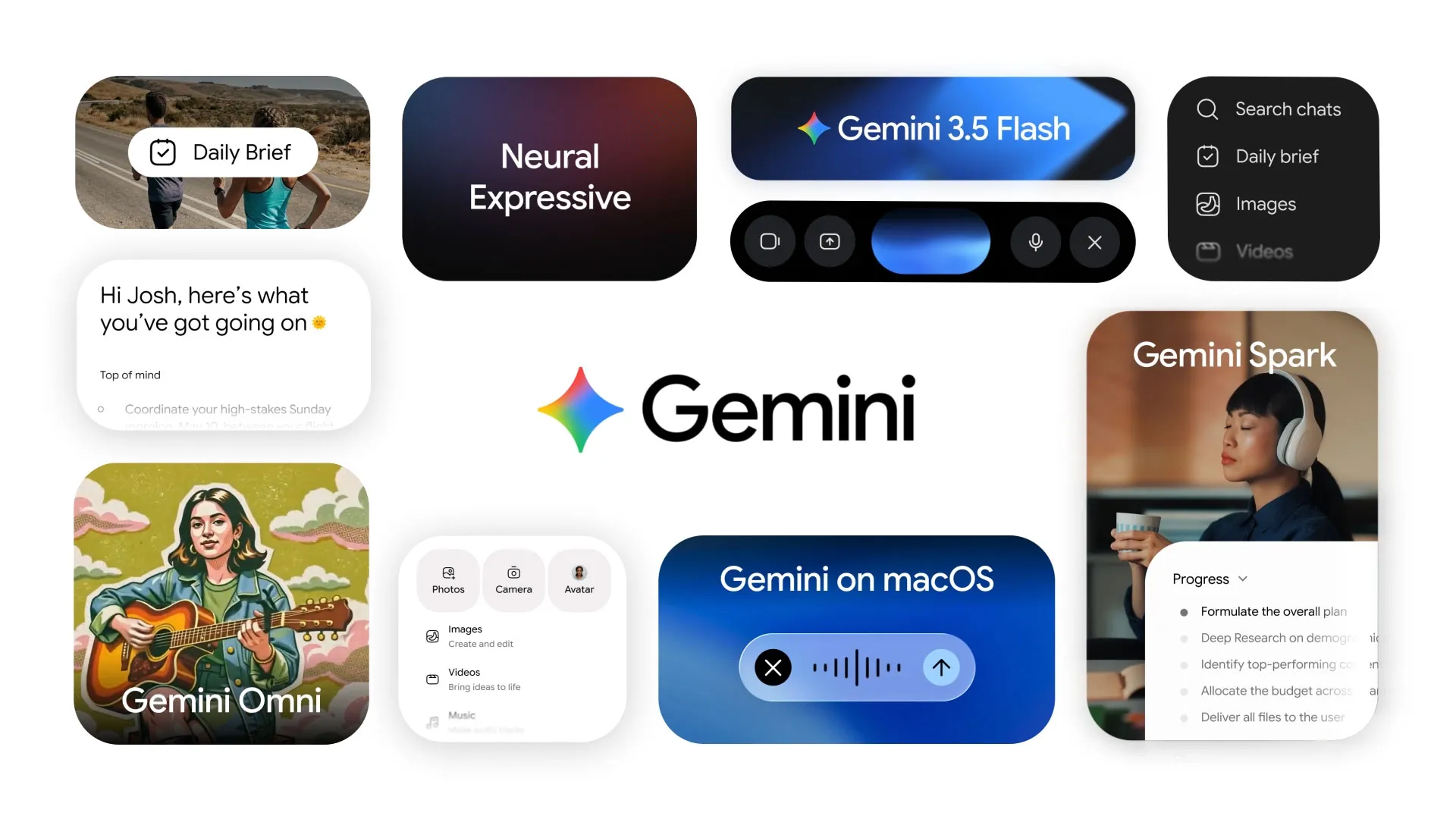
Gemini Spark is a personal AI that runs in Google’s cloud all the time, not on your phone, and can read and act across your Gmail, Calendar, Docs, Sheets, Drive and Tasks even when your device is off. It is the closest thing to a personal assistant most people have ever had, and it is bundled into Google AI Pro for $20 a month.
Google described Spark at I/O 2026 as a “personal agent that takes actions on your behalf”. The official keynote post walked through several concrete examples. 9to5Google’s coverage has the demo details. Quartz also wrote up the launch in detail.
Real World Examples of Gemini Spark in Action
Spark is at its best on small tasks that, if you did them yourself, would take 5 to 15 minutes each. Google demoed several at I/O 2026 that translate directly to everyday life.
Find hidden subscriptions you forgot about
You give Spark access to your bank or credit card statements. It scans for recurring charges that have been hitting you every month. It tells you “you are paying ₹1,400 for a streaming service you have not used in eight months”. You decide whether to keep or cancel. The savings often pay for the Google AI plan many times over.
Watch school emails for deadlines
Spark reads emails from your child’s school. Parent teacher meetings get added to your calendar automatically. Fee deadlines turn into reminders. Forms that need signing get flagged at the top of your day. The mental load of school admin drops dramatically.
Turn meeting notes into polished documents
You take messy notes during a meeting. Spark turns those notes into a clean shared doc, a follow up email to participants, and a list of action items added to your task list. You approve. Done. 20 minutes of work compressed into 30 seconds of review.
Catch flight and hotel changes before you do
Spark watches your inbox for travel updates. Flight delays, gate changes, hotel cancellations. It surfaces them at the top of your day and updates your calendar in real time. Useful for anyone who travels more than once a quarter.
Here is the part that makes Spark genuinely new. The AI runs in Google Cloud, not on your device. So it keeps working when your phone is off, when you are asleep, when you are on a flight without internet. By the time you check your phone in the morning, the work is already done. That is a real category shift from the AI that opens when you ask.
What Daily Brief Is Alongside Gemini Spark
Daily Brief is the second new agent feature Google launched at I/O 2026. It is much simpler than Spark and most people will find it useful immediately.
Every morning, Daily Brief writes you a personalised summary of your day. It pulls from your Gmail (only the important threads), your Google Calendar (with smart conflict detection), your Tasks (with priority ordering), your travel plans, and any other source you grant access to. The output reads like the morning briefing a chief of staff would prepare for a busy executive. Now everyone has one.
According to Android Authority’s coverage and Business Standard’s report, Daily Brief started rolling out on May 19 to US users on the Google AI Plus, Pro and Ultra plans, with international rollout following in the weeks after.
How Gemini Spark Compares to Other Personal AI Agents
Spark is not the only personal AI agent in 2026. OpenAI launched Operator earlier. Anthropic has Claude Computer Use. Microsoft has Copilot agents baked into Microsoft 365. Here is the honest comparison.
Spark wins on Google ecosystem depth
If you live in Gmail, Calendar, Docs, Sheets and Drive, no other agent has the same level of native access. Spark reads and writes across the suite without permission grants that feel awkward. Microsoft Copilot does the same for the Microsoft 365 ecosystem, not the Google one.
Operator wins on third party web tasks
OpenAI’s Operator can actively control a web browser, click buttons, fill forms and complete tasks on websites that have no API. Spark does not do this yet. If your workflow involves a lot of “click around the web”, Operator still has the edge.
Microsoft Copilot wins on Office and Outlook
If your work life is in Outlook, Word and Excel, Copilot agents have the same kind of native depth that Spark has in the Google equivalents. Pick the one that matches the email and document tools you actually use.
Apple Intelligence is still behind
As of May 2026, Apple Intelligence still does not do background agent work in the same way. Apple users get Gemini Spark through the Gemini app, since Spark works on iPhone, but it does not get the native iOS integration that Google’s Android users get.
Setting Up Gemini Spark for the First Time
If you have a Google AI Pro, Ultra or Ultra Premium subscription, you can turn on Spark from the Gemini app today. The setup is roughly five minutes if you do it carefully.
Step one: open the Gemini app and find Spark
Spark lives under the new “Agents” tab in the redesigned Gemini app. If you do not see it, you may need to update the app to the latest version. The Neural Expressive redesign launched at I/O 2026 includes Spark out of the box.
Step two: grant scoped permissions deliberately
Spark asks for permission to access each Google service separately. Gmail, Calendar, Tasks, Drive, Sheets. Read the prompts carefully. You can pick which services Spark touches, which is genuinely useful if you have shared accounts or specific privacy concerns.
Step three: tell Spark what kind of tasks to handle
The setup wizard walks you through example tasks. Watch for subscription charges. Read school emails. Surface meeting prep. Add commitments to my calendar. Pick the ones you actually want. You can add or remove tasks later from the same screen.
Step four: review the first day’s output
For the first 2 to 3 days, Spark works in “shadow mode”. It tells you what it would have done but does not actually do anything without your approval. Use this period to tune the tasks. Once you feel comfortable, switch to autonomous mode where Spark just acts and notifies you.
Gemini Spark Privacy and the Cloud Question
The fact that Spark runs in Google’s cloud, not on your device, is worth a moment of attention. It is the source of Spark’s power. It is also the source of the most common concern.
Google’s official privacy statements, including the main Google privacy policy and the Gemini specific privacy notes, lay out what happens to your data. The short version: your emails, calendar entries and documents are processed by Spark to perform the task you asked for, are not used to train models without your opt in, and can be deleted on request. Enterprise customers on Google Workspace get stronger data protection commitments by default.
For most consumers, this is the same privacy model already in place for using Gmail at all. Spark does not introduce a fundamentally new exposure. For businesses, especially those in regulated industries, the same data residency and processing questions you already ask about Google Workspace apply to Spark.
What Gemini Spark Cannot Do Yet
Honest about the limits. Spark in May 2026 is impressive but not magic. Here are the things it does not do well, or at all, yet.
Web browsing automation
Spark cannot reliably control a web browser to click through third party websites the way OpenAI Operator can. If a task requires logging into a portal and clicking buttons, Spark will tell you it cannot do that.
Money movement
Spark can read transaction data and suggest actions, but it will not actually transfer money, cancel a subscription on a third party site, or make a payment. Google has been explicit about keeping money movement human in the loop in this first release.
Long term memory across topics
Spark remembers a lot within a topic but the cross topic memory is still limited. If you taught Spark something three weeks ago in a different context, it may not bring that context to today’s task. Expect this to improve over the rest of 2026.
Real time pricing on third party services
When Spark surfaces a price comparison, the data may be slightly stale. For high stakes purchases verify the live price before acting on Spark’s recommendation.
Daily Brief and Gemini Spark For Indian Users
Daily Brief and Spark launched in the United States first. For Indian users on the Google AI Pro plan (around ₹1,950 a month in India), access has been rolling out in waves through May 2026 with full availability expected by early June.
The Indian rupee pricing approximately matches the US pricing after VAT and the exchange rate. Spark works in English, Hindi and most major Indian languages out of the box. Daily Brief currently produces its summary in your Gmail’s default language with multilingual support expanding over the coming months.
The use cases are the same and arguably more useful in the Indian context, where school admin alone (emails from school WhatsApp groups, fee reminders, form submissions, exam schedules) consumes a meaningful amount of every parent’s week.
Gemini Spark and Daily Brief Frequently Asked Questions
What is Gemini Spark?
Gemini Spark is a personal AI agent launched by Google at I/O 2026 on May 19. It runs in Google’s cloud 24 hours a day, 7 days a week, and can take actions across Gmail, Calendar, Docs, Sheets, Drive and Tasks even when your phone is off. It is powered by Gemini 3.5 Flash and bundled into Google AI Pro, Ultra and Ultra Premium plans starting at $20 a month.
How is Gemini Spark different from regular Gemini?
Regular Gemini is the conversational AI you open and ask questions. It works when you talk to it and stops working when you close the app. Gemini Spark keeps running in the background, acts across your Google services without you opening the app, and surfaces results to you when something needs your attention. The category is closer to “personal assistant” than “chatbot”.
Is Daily Brief free?
Daily Brief is included in Google AI Plus, Pro and Ultra plans. The free tier of Gemini does not include Daily Brief. Pricing starts at around $9 per month for the Plus tier in the US and rises to $200 per month for AI Ultra Premium. Indian rupee pricing is roughly ₹1,000 to ₹16,800 per month depending on the tier.
Can I use Gemini Spark on iPhone?
Yes. The Gemini app is available on iOS and Spark works through it. The integration is slightly less deep than on Android since Apple controls more of the iOS notification and background processing model, but the core Spark features work on both platforms.
Is Gemini Spark safe for sensitive work emails?
Google’s privacy commitments cover Spark the same way they cover Gmail. Your emails are processed by Spark to perform the tasks you authorise, are not used to train models without your opt in, and can be deleted on request. Business users on Google Workspace get additional data protection commitments. For very sensitive contexts, the safest path is to scope Spark’s permissions tightly during setup and use shadow mode until you are comfortable.
How Precision Pulse Helps Businesses Use Gemini Spark and Daily Brief
Precision Pulse works with operating teams to set up Gemini Spark and Daily Brief on the workflows that actually matter for your business. We identify the repetitive admin tasks that drain your senior people, design the right permission scopes for Spark to handle them safely, and measure the time savings honestly. If Spark is paying for itself, your numbers will say so. If it is not, we will tell you.
See our AI automation services for how we engage. For broader context, read our full Google I/O 2026 recap, our analysis of AI coding agents in 2026, and the comparison of Google Antigravity and the other major AI coding tools.
Want help putting Gemini Spark and Daily Brief to work in your business?
We help operating teams pilot personal AI agents on one workflow that actually matters, with the right permissions and honest measurement of time saved.
Why Gemini Spark matters more than the keynote suggested
Spark is the first widely available personal AI agent that runs continuously, not on demand. Most people will install it because it is bundled with Google AI Pro. The ones who tune it deliberately, on the few workflows that actually drain their week, will free up real time. Treat this as an operating decision, not a gadget download.